Add Technical Field column to bulk edit screen
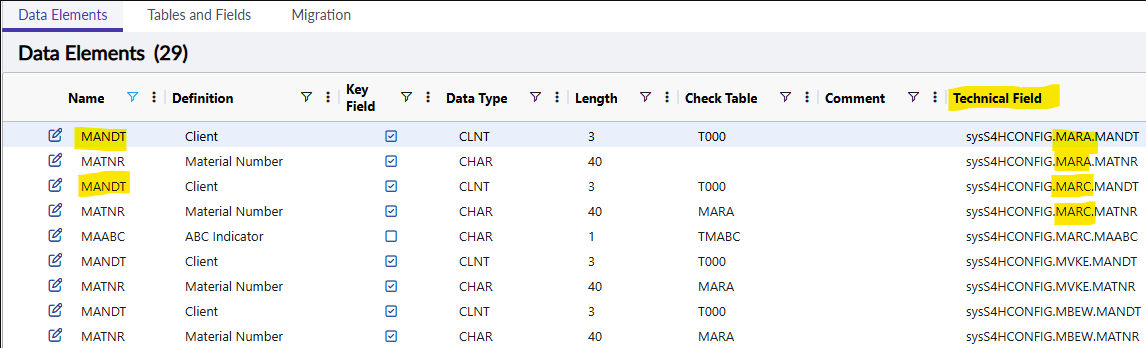
In Dataset Design there is a "Technical field" column in Data Elements Tab.
It helps to identify which table each data element refers to - especially when various rows have same name value.
When performing Dataset Bulk Edit, this column is not displayed, resulting confusion accross rows with same name value.
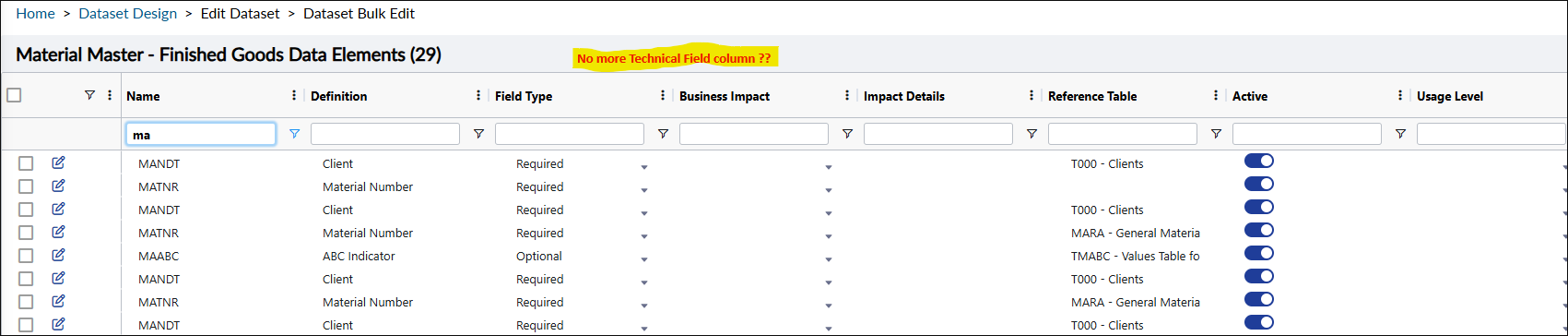
Idea: add this non-editable column to Bulk edit screen
Log in to comment and vote
Comments3
nikhileshshirsale
Apr 28
I had a call with guillaume yesterday & the confusion arises because the unique technical identifier for a Data Element is visible on the “Data Elements” page but disappears in the “Dataset Bulk Edit” page, even though users still need it to distinguish between elements with the same name.
the requirement is not to have it editable, but to show ”technical field” on the bulk edit page. I will discuss this with our Dev team and see if we can add the missing column in the column list.
John Munkberg
Apr 25
I agree with making this field EDITABLE, but not sure the value of making it BULK EDITABLE? You would not assign several Data Elements to the same Column, nor should you manually a bunch of Data Elements and then come back and assign them all to a column. But - certainly you have a scenario in mind that I’m missing?
But 100% agree it should be EDITABLE, which it is not today….
Guillaume Dutey
Apr 27
Suggestion here is to have it VISIBLE from bulk edit screen.
To make it EDITABLE is a plus.
On my screenshot #1, there are multiple rows with name MANDT or MATNR because dataset has various tables (MARA, MARC, MVKE, MBEW) with those same column names. When switching to bulk edit screen, we lose visibility on which table each row refers to.