Prevent UI elements from being hidden in table layouts
UI elements (like the History, View, and Download buttons for Migrate reports) are included in table layouts, and often placed on the end of a table. When viewing the application the end column is often minimized to the point of hiding these buttons, or obscuring several of the options.
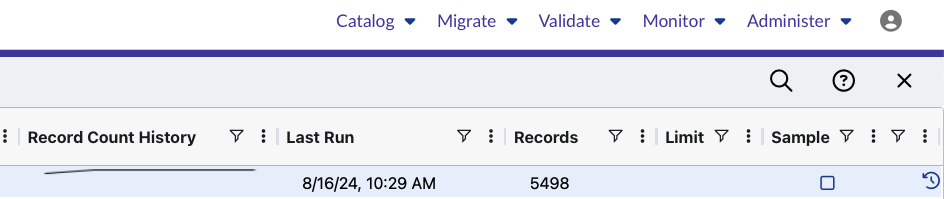
A user has no way of knowing these elements exist unless they previously experienced them. Even if a user has experience with them, this problem is often compounded by the fact that the end column of a table can’t be expanded by dragging like
all other columns. The user must right click the header and selecting the “Autosize” option to fix the issue.
Log in to comment and vote
Comments2
John Munkberg
Feb 14, 2025
Every user has a different focus, and to lock a column for one user will greatly frustrate the next user. While there is no perfect solution, I’m opposed to forcing a particular layout, or particular fields to be “Locked”. I’m very open to other suggestions for how to make the excess columns “visible” in some way to a new user without being intrusive for existing users. The features available AG Grid should be consistent across the platform (they are not today, but we are working on it), so once a user it trained, mentored, or experienced this would not be a problem.
I’m a fan of User Choice and Flexibility, but always open to suggestions. So thank you for the request.
Tyler Triemstra
Apr 11, 2025
Totally agree, I don’t think we should lock the width, just default it to being visible within the grid, even if it’s not in the user’s view. It’s fine if they need to scroll over to see the icons, we’ve just been having issues where the icons aren’t even visible on open as shown in the screenshot above. Understand if it’s not necessarily a priority.