Report Details Screen - Add Fields
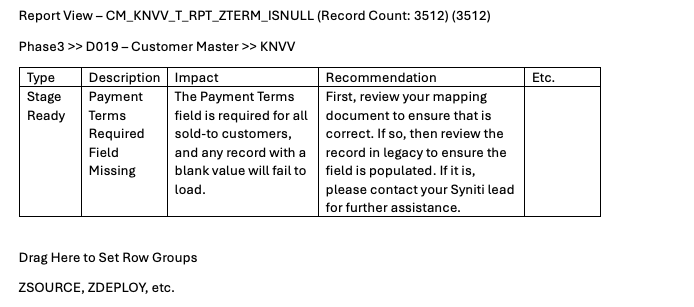
When you open up a list of reports in Migration Reports or Deployment Reports, you see many helpful fields like Report Type, Description, History, etc. Once you click the preview button you go to a new screen with the contents of the report, but almost all of that information goes away. This results in lots of back and forth for the user, as many times they really need to look at the report contents first and then they can decide what to do - this is the point in time where they need to see the impact, cleansing recommendation, etc. Right now they have to toggle back to go see it, then go back into the report.
I attached a very rough mock up of where it could go on the screen - we have plenty of real estate to work with. If others agree, would be great to pull together a quick focus group to figure out what all fields we'd want to add, but I think at bare minimum it should be description, impact, recommendation, history. A button to pull in the DDL of the report code would be handy too - lots of possibilities and opportunities.
CURRENT

DESIRED
Log in to comment and vote
Comments1
John Munkberg
Oct 1, 2024
Peter, thank you for your feedback. There is a larger initiative to revamp how Migration reports (and DQ Reports) are created and consumed. The goal is to move away from the endless list of Excel files and move to a more interactive online interface. We want to users to have access to all the data, the mappings, and the reporting metadata from a single place. Agree that having to click around between screens is not ideal.
When we have the next stakeholder meeting we will reach out for your input.