Report to show the Audit Logs(Syniti change log report)
create a report which can show the Audit logs.
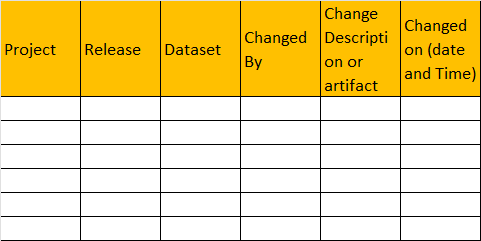
Project team needs to see who has changed the mapping/dataset/rule in Syniti ADMM on which date and time or let us know if any report is available which can show the audit logs. Let us know if any existing report is available in your point of view!
Log in to comment and vote
Comments12
Kevin McDonald
May 5
Hi Arunsasi - Thank you for your feedback — we’ve received it and are actively reviewing it.
Should we need any additional details or clarification, we’ll reach out. We appreciate you taking the time to share your experience and help us improve the product.
Arun Sasi Maliyakkal
May 6
Thank you @Kevin McDonald Appreciate your reply. We will need this feature as soon as possible.
Franz Lang
May 6
Hi @Kevin McDonald
thanks for the support here.
Arun flagged the importance of this feature in our call a few minutes ago.
Can you please focus on this one with Jon?
Thank you,
Franz
nikhileshshirsale
May 7
Hi @Arun Sasi Maliyakkal, @Franz Lang,
Our ADMM already captures change history at multiple levels, although there is currently no single consolidated report in the exact tabular format described.
Existing capabilities today:
Field Mapping History: Each mapping field includes a History button on the left-hand side, which displays all updates made to that specific field (who changed it and when).
Dataset & Data Element History: Similar history tracking is available at the Dataset and Data Element levels, allowing users to review changes over time directly from the UI.
Full Object History Search: A comprehensive Object History Search is available under Admin → Security, where all changes across objects and tables are logged. This functionality primarily supports audit and compliance requirements.
As i said earlier, there is currently no single consolidated report in the exact tabular format described in the description above.
Arun Sasi Maliyakkal
May 8
Hi @nikhileshshirsale
Project team is looking for a consolidated report or SQL Query which can be created as a System report to check all the changes at one place. (Field Mapping>Dataset/Data Element>Object Level )with the normal User name instead of ID/GUID
Would appreciate if this could be clubbed in to a single consolidated report.
nikhileshshirsale
May 8
Yeah single consolidation is currently not available or you can say it was never a requirement. I need to check if an SQL query can suffice your requirement. I will get back on this.
Thanks
Arun Sasi Maliyakkal
May 8
Thanks for the update Nikhilesh!
Arun Sasi Maliyakkal
Jun 1
Hi @nikhileshshirsale Could you please check if there is any advanced SQL Query which can suffice our requirement. Thanks for your support
nikhileshshirsale
Jun 3
@John Munkberg are you aware of any?
Arun Sasi Maliyakkal
Jun 22
Hi @John Munkberg Greetings for the day!! Any update on this?
John Munkberg
Jul 13
Hey Arun, sorry for the delayed response.
Yes - all this information is available in various places. Traditionally - these projects are big and we expect that the Migration Developers are managing that change on their objects. The scope of the HISTORY is generally at the object or mapping level for this case, and we have Notifications that can be triggered when things change. We know mappings change during the Mapping and Build phase - but once it all settles down we can turn on Notifications which triggers alerts to subscribers so they will be “alerted” by the unexpected changes.
I think your request make sense from a Centralized View of what is changing. I think we can easily create a System Report to list the Design and Mapping changes - but performance may be a problem as this report may get rather large across a single huge project.
While that report may be interesting for Metrics - I would still encourage your team to use the Subscription features so they get notified when these items change unexpectedly. That allows these users to be a bit more proactive in asking why the design is changing, etc. Reporting after the fact is tough to follow up on specific details - especially on a large project.
Arun Sasi Maliyakkal
Jul 14
Thank you for the response @John Munkberg So to summarize Syniti can likely provide a centralized change-reporting capability, but the recommended best practice is to use Subscriptions and Notifications to proactively monitor mapping and design changes, especially in large migration projects.